Proximity Search
Proximity search asks for objects near a point, but the best index depends on whether objects are static businesses or rapidly moving drivers.
Proximity search asks for objects near a point, but the best index depends on whether objects are static businesses or rapidly moving drivers. Spatial indexing narrows the candidates. Exact geometry and freshness checks determine whether those candidates actually satisfy the request. Keep these two responsibilities distinct.
Learning goals
Coordinates; geohash/grid cells; neighboring cells; R-tree intuition; approximate candidate selection; exact distance; poles/dateline; update frequency.
The mechanism at a glance
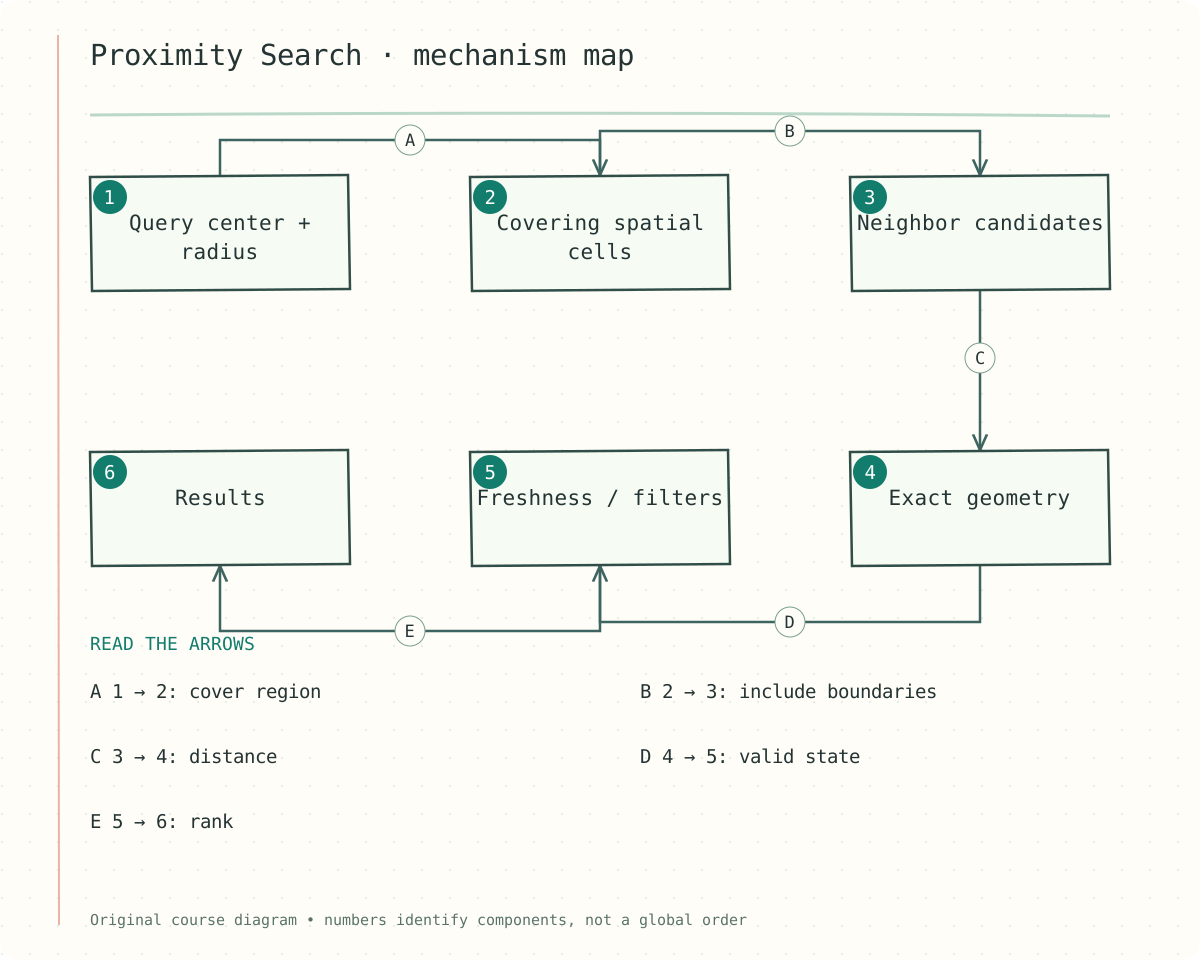
Figure — Query center + radius → Covering spatial cells (cover region); Covering spatial cells → Neighbor candidates (include boundaries); Neighbor candidates → Exact geometry (distance); Exact geometry → Freshness / filters (valid state); Freshness / filters → Results (rank)
The numbered components identify responsibilities. Follow the labeled arrows rather than treating the numbers as a global execution order. The scenario later in this lesson shows one concrete sequence.
Step-by-step reasoning
1. Represent location correctly
Store latitude and longitude with a defined coordinate system and validation rules. Distances on the earth are not generally Euclidean distances in raw degrees. Handle longitude wraparound and polar behavior when the product’s geography requires it. Location timestamps and accuracy estimates can be as important as coordinates.
2. Use cells or tree indexes to narrow work
A geohash or grid maps nearby areas to cells; hierarchical cells allow different resolutions. R-tree-style indexes organize bounding regions. Smaller cells reduce unrelated candidates but increase the number of cells a broad query touches. Choose resolution based on density, radius, and update rate.
3. Search neighbors and filter exactly
Find every cell intersecting the requested radius or expand until a nearest-neighbor stopping rule is justified. Searching only the current cell can miss the nearest object. Compute actual distance and apply filters after candidate retrieval. A square or bounding rectangle includes points outside a circular radius.
4. Handle moving objects as a freshness problem
Drivers update locations frequently, so use a read model optimized for current positions and expiration. Reject stale updates using sequence or timestamp rules appropriate to the source. A nearby location is only a candidate for dispatch; availability and assignment still require authoritative state.
Contracts and state
The following sketch makes the decision boundary concrete. Field names and capacity assumptions are illustrative; adapt them to the stated product contract.
Candidate(point_id, lat, lon, observed_at, accuracy)
nearby(point, radius):
  cells = cover(point, radius)
  candidates = read(cells)
  return exact_distance_filter(candidates, radius)
Moving candidates also require a freshness predicate.
Worked example
A dense city center contains thousands of businesses in a coarse cell, while a rural cell contains only a few. One fixed resolution may overfetch in the city and require many empty lookups in the countryside. Adaptive resolution or a mature spatial index can improve the trade-off. Validate query correctness before optimizing candidate counts.
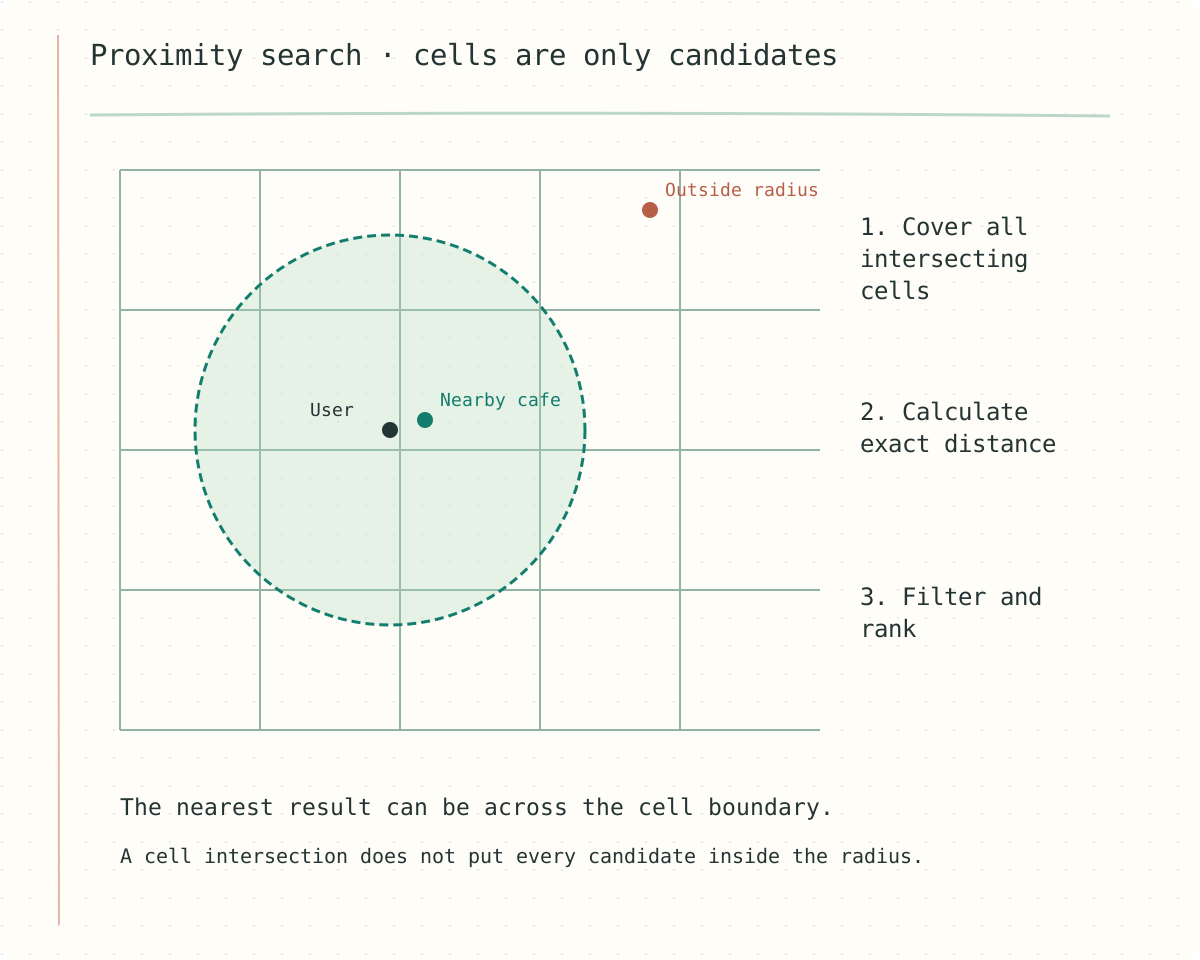
Figure — Search neighboring cells, then use exact distance. The grid alone is not the answer.
Failure walkthrough
A driver’s older location arrives after a newer update and moves them backward on the map. Store a monotonic per-device sequence or carefully validated event-time policy so late updates cannot replace fresher state. Expire stale presence and recheck availability before assignment. Exact distance to an old coordinate is still an outdated answer.
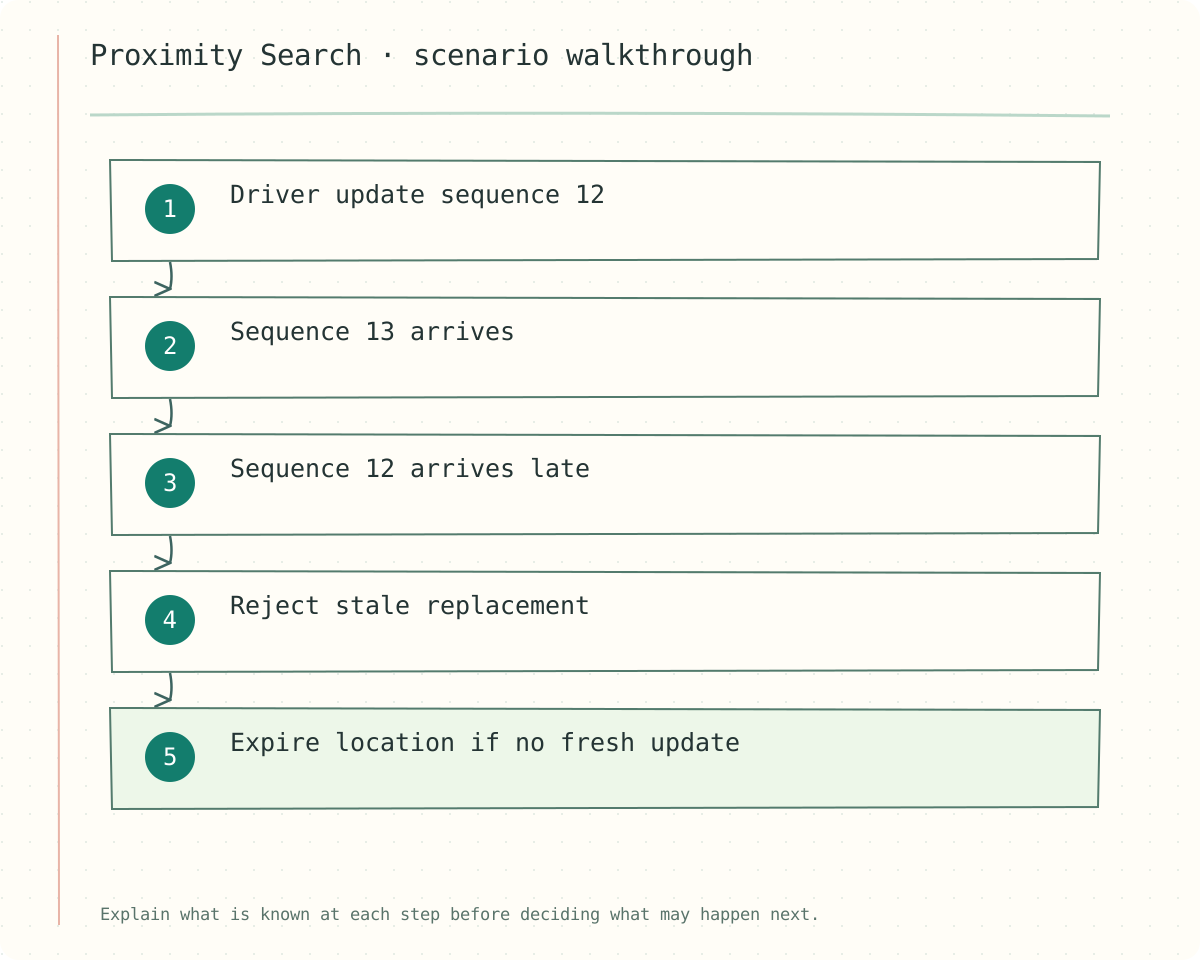
Figure — Driver update sequence 12 → Sequence 13 arrives → Sequence 12 arrives late → Reject stale replacement → Expire location if no fresh update
Decisions and trade-offs
| Index choice | Strength | Cost |
|---|---|---|
| Grid / geohash | Simple locality and bucketing | Boundary and resolution handling |
| Spatial tree | Bounding-region search | Update and implementation complexity |
| Current-location cache | Fast moving-object reads | Expiry and stale update handling |
Check your understanding
Why is a point in an intersecting cell not automatically inside the requested radius?
Show answer and explanation
Answer: The cell covers an area that can extend outside the query circle. Candidate retrieval should be inclusive enough to avoid misses; an exact-distance filter removes false positives afterward.
Transfer to a new scenario
Compare relatively static businesses with rapidly moving drivers.
Why can searching only the user's own cell miss the nearest result?
Continue the connection
Study Elasticsearch and explain which guarantee from this lesson carries into that topic.
Use geometry to narrow, then verify
A spatial index reduces candidate search. A grid or geohash maps coordinates to cells; an R-tree groups bounding regions. Neither makes every candidate a true match. Enumerate regions intersecting the query radius, calculate the appropriate distance for each candidate and filter before ranking.
Cell size trades index fanout against false candidates. Large cells are cheap to enumerate but dense; small cells require visiting many neighbors for wide-radius queries. Near poles and the date line, naive longitude arithmetic breaks. Use a suitable geographic distance calculation and coordinate normalization.
For moving objects, attach sequence and observation time. A location index can lag or retain an offline driver. Eligibility and assignment need current authoritative state. To find nearest K, expand the search until the unseen region cannot contain a closer candidate under your distance bound, or clearly label an approximate heuristic.
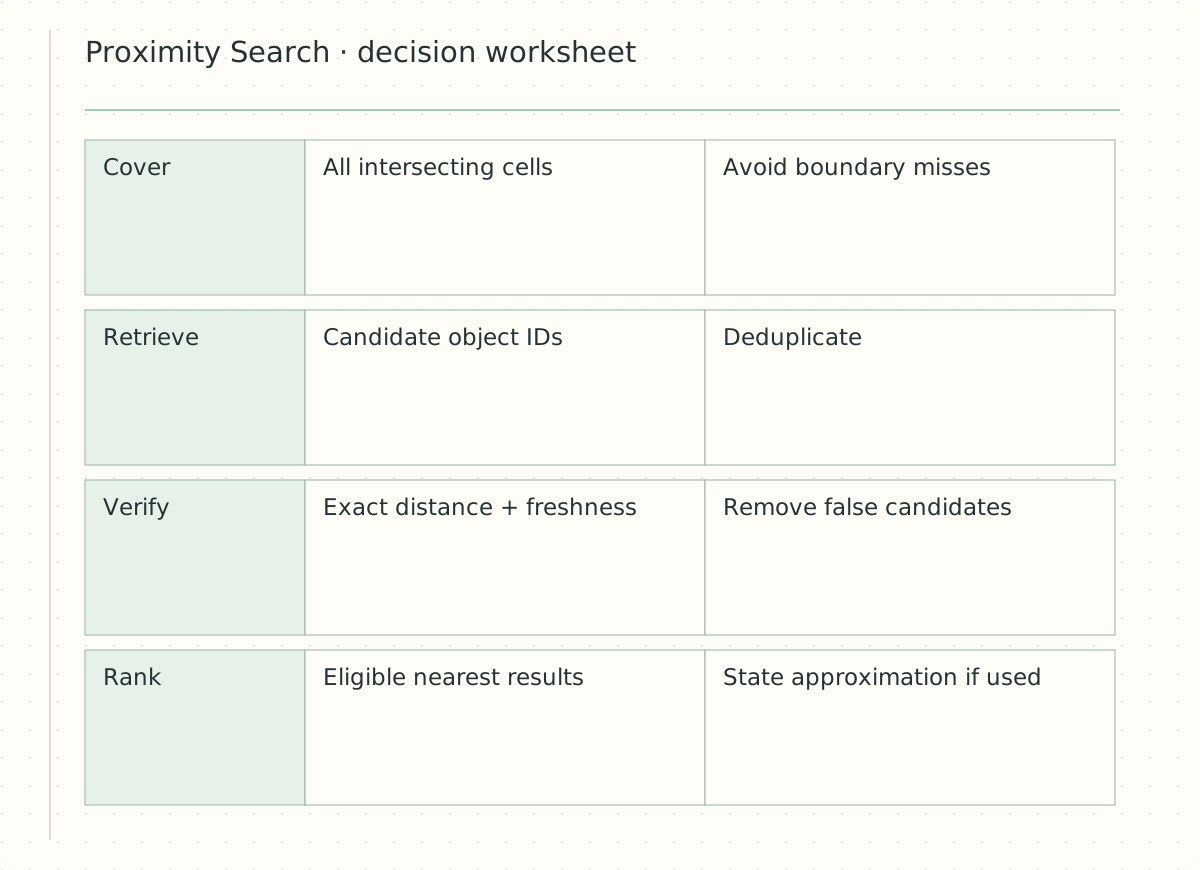
Figure — A decision worksheet for Proximity Search: read the mechanism and its guarantee together.
Operational sketch
cover query circle with intersecting cells
fetch candidates from all cells
deduplicate object IDs
compute exact geographic distance
filter radius and current eligibility; rank
A tempting mistake
Checking only the user’s cell misses a close point over the boundary. Sorting approximate cell centers is not the same as sorting actual point distances.
Transfer exercise
Why can a wide-radius query in a dense city be expensive even with a spatial index?
Show answer and explanation
Answer: The valid candidate set itself may be large. Bound results, choose useful filters and use a top-K strategy with justified stopping conditions.
Why is a point in an intersecting cell not automatically inside the requested radius?
Your design draft
Clarify assumptions, explain your approach, and test the difficult cases. Save your draft, then compare it with the study notes.
Self-review checklist
Self-guided practice. Automated AI feedback and code execution are not connected.